AI product design case study

RolePilot

Navigate your next opportunity.

A job-fit analysis and resume-tailoring workbench. I defined the product, designed the end-to-end experience, and built the working MVP solo - from problem framing to deployed code.

Fit analysis Evidence mapping Targeted regeneration Version history CV + cover letter
Independent product Started May 5, 2026 Sole designer and developer Working MVP
Paste job
New application
RolePilot new application screen with a pasted job description ready to generate
Check fit
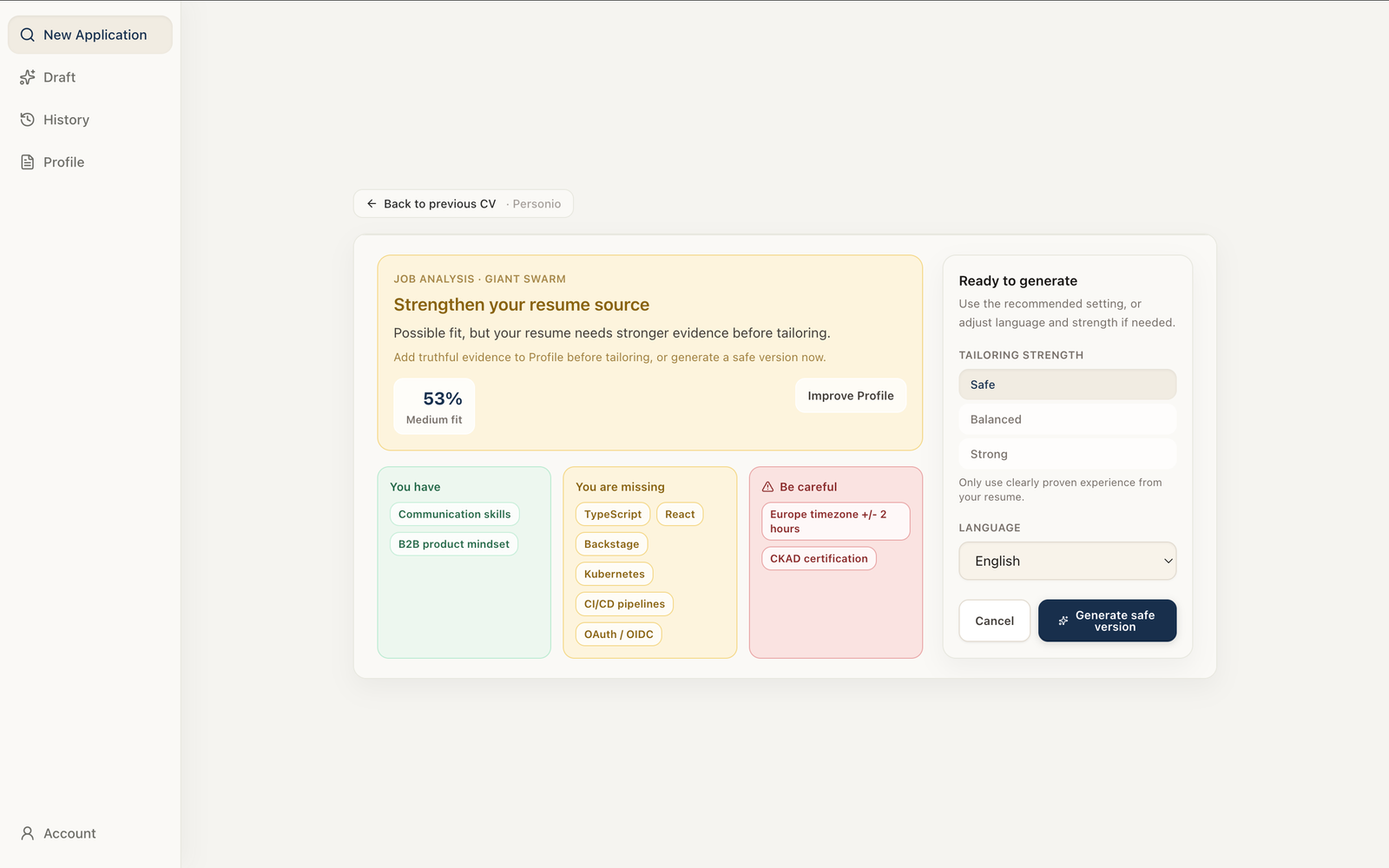
Job analysis
RolePilot job analysis showing the role fit before generating application documents
Review CV
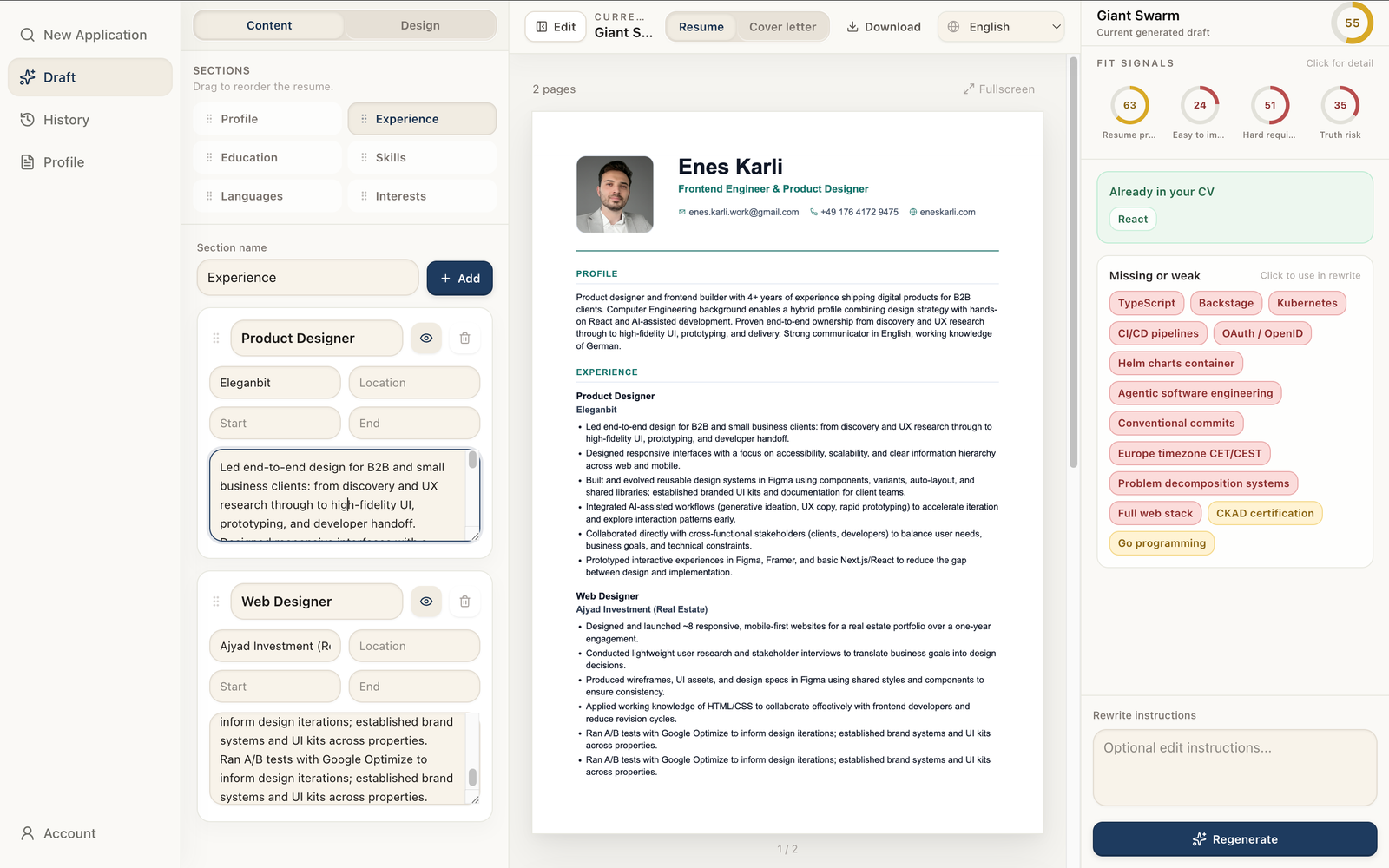
Current draft
Generated CV shown beside editable source content and job-fit suggestions

What RolePilot does

Fit analysis first, document generation second

The system extracts job requirements, maps them against the user's saved profile, surfaces gaps and risks, then generates and iterates documents within the same interface.

See fit score Review evidence Accept suggestions

Analyse fit

Map requirements against the user's profile. Surface strong matches, weak coverage, and deal-breaker gaps before any writing starts.

Select evidence

Pull relevant facts from the saved profile automatically. No re-entering context for each application.

Generate truthfully

Rewrite and reframe real experience. Flag unsupported claims before they reach the document.

Review and export

Edit inline, iterate on specific sections, save versions, and export the final CV and cover letter.

One application - from job description to improved CV

rolepilot.app/generate
New application

Paste a job
Understand your fit
Generate a tailored application

Start with any role description. The app will pull out the important requirements, flag gaps, and then generate a CV and cover letter that stay close to the truth.

UX Designer, AI Developer Experience

Design intuitive interfaces for AI-powered developer tools. Create prototypes, simplify complex systems, and work across design, product, and engineering.

Requirements
AI interaction design · prototyping · systems thinking · developer tools
Ready to create a draftCompare the job with your Profile and build the first draft.
Generate  ⌘↵
Job Analysis · Example company

Review gaps, then generate

Your background has enough relevant evidence for this role, but the application should make AI workflow design and developer-facing work more visible.

68%Good fit
You havePrototypingSystems thinkingFrontend
You are missingAI workflow proofDeveloper tools
Be carefulLarge-scale DevEx
Ready to generateUse balanced tailoring to emphasize the strongest supported evidence.
Generate tailored resume

Resume editor

Content and design controls

Profile
Experience
CV · 1 pageDownload · Fullscreen
Example companyCurrent generated draft
68
71Proof
82Improve
64Hard req.
92Truth
Already in your CV
PrototypingSystems thinking
Missing or weakClick to use
AI workflowsDeveloper toolsDevEx scale
Regenerate

Resume editor

Content and design controls

Profile
Experience
CV · 1 pageDownload · Fullscreen
Example companyCurrent generated draft
68
71Proof
82Improve
64Hard req.
92Truth
Already in your CVQueued
PrototypingSystems thinkingAI workflowsDeveloper tools
Missing or weakClick to use
DevEx scale
Apply 2 suggestions & regenerate

Resume editor

Updated tailored draft

Profile · Updated
Experience
CV · Updated versionDownload · Fullscreen
Example companyUpdated generated draft
81
84Proof
89Improve
72Hard req.
94Truth
Applied in this versionResolved
AI workflowsDeveloper tools
Still unsupported
DevEx scale
Regenerate

01 - The problem

A general CV misrepresents fit. Tailoring it manually doesn't scale.

Each role surfaces different requirements. Relevant experience is buried, absent, or framed for the wrong audience - and fixing that manually takes 20–40 minutes per application.

Core problem

Two options, both with significant trade-offs

Generality reduces relevance. Relevance multiplies manual effort. Neither option lets the user understand their actual fit before investing time in the application.

Reuse one general CVFast to send. Relevant experience is often absent or buried. The application undersells the candidate without them knowing it.
Tailor manually per roleHigher relevance, but requires reading the JD, selecting evidence, rewriting sections, verifying accuracy, and reformatting the document - every time.
The repeated task

Each application required the same five manual steps

AI chat reduced writing time but didn't unify the workflow. Context still had to be re-entered, outputs still had to be verified, and documents still had to be assembled and formatted manually.

Parse the JDIdentify required skills, experience level, and likely deal-breakers from unstructured job copy.
Audit your profileManually cross-reference past roles, projects, and skills against each requirement.
Rewrite the CVRestructure summary, bullets, and section order to match the role's priorities.
Verify accuracyCheck for unsupported claims, missing requirements, and language borrowed from the JD that the profile doesn't back up.
Produce the documentTransfer final copy into a formatted layout, export, and archive a versioned copy.
Early experiments

Three personal prototypes before RolePilot

These were tools I built for my own job search - not part of the RolePilot design process. Each reduced one friction point and exposed the next. They established what a complete solution needed to handle.

General AI chat
Tailor resumeAI assistant
Here is my current resume: Product designer with experience in research, prototyping, and frontend development...
I have the resume. Paste the job description and I will tailor it.
UX Designer, AI Developer Experience. The role needs AI interaction design, prototyping, and systems thinking...
Here is a tailored draft:
Product Designer - AI Experiences
Designed and prototyped clear AI-assisted workflows...
Ask a follow-up
Attempt 01

AI chat: paste CV + JD, request a rewrite

Pasted CV and job description into a general AI chat. Reviewed the output, iterated via follow-up prompts, then copied the result into a document manually.

ReducedFirst-draft writing time vs. editing from scratch.
Remaining frictionContext re-entered every session. Claims required manual verification. No document output - copy/paste into a separate tool.
Personal terminal script
tailor-cv~/job-tools
$ npm run tailor-cv
[1/4] Reading ./cv.md ... done
[2/4] Paste job description:
> UX Designer, AI Developer Experience...
[3/4] Sending resume + job to AI...
[4/4] Generated tailored resume
SUMMARY - Product designer building clear, trustworthy AI workflows...
Attempt 02

CLI script: persist CV, automate the prompt

Built a Node script that loaded my saved CV from disk, accepted a JD via stdin, and sent both to the API with a fixed instruction set.

ReducedContext re-entry and prompt inconsistency eliminated.
Remaining frictionOutput was plain text only. No fit explanation, no evidence mapping, no review surface, no document formatting.
Simple web utility
CV Tailor
Create a targeted CV
Job description Required
UX Designer, AI Developer Experience

Design intuitive AI workflows. Create prototypes. Work across design, product, and engineering...
Generate CVGenerating...


Attempt 03

Web UI: JD input → CV preview → PDF export

Wrapped the script in a browser interface: JD textarea, generate button, live preview pane, PDF download, and a clear result state that made the output feel more trustworthy.

ReducedGeneration, preview, and export unified into a single workflow.
Remaining frictionProduced a document but gave the user little visibility into fit, no control over which claims the AI included, and no way to review or reject changes.
Design opportunity

Each iteration eliminated one manual step but left the user blind to fit, unable to review evidence selection, and exposed to unsupported AI claims. The product opportunity was to surface the analysis the user needed to make informed decisions - before and during document generation.

Design question: How do we let users move from job description to tailored application quickly, without obscuring uncertainty or generating claims their profile can't support?

02 - Designing RolePilot

Reframed from personal tool to user-centred product

I restarted from the user problem rather than the technical implementation. The core need was not faster generation - it was giving users enough information to make confident decisions about fit, evidence, and trust.

Goal

Reframe success as informed decision-making

Shifted the product goal from "generate a CV" to "help users decide whether and how to apply" - making fit analysis the entry point, not a byproduct.

Safety

Constrain the AI to verified profile data

Defined a hard boundary: the system selects, reorders, and rewrites real experience. It does not fabricate skills, employers, achievements, or qualifications.

Structure

Separate data layers explicitly

Modelled five distinct layers - user profile, job requirements, evidence matches, suggested changes, and output documents - and kept them visible and editable independently.

Layout

Evaluate three navigation patterns

Compared immediate generation, a linear wizard, and a co-present workspace. Chose the workspace to allow review and iteration without back-navigation.

Prototype

Build to test AI-specific states

Static mocks couldn't evaluate loading states, partial outputs, or regeneration behaviour. I built functional prototypes to test these interactions directly.

Improve

Iterate on real applications

Used RolePilot on live job applications and ran informal sessions with job-seeking friends. Prioritised fixes based on confusion patterns and generation failures.

User evidence

What users needed most

They did not want another writing tool first. They wanted a quick way to judge fit, see the gaps, and decide whether tailoring the application was worth the time.

User evidence

What reduced hesitation

Keeping the job, fit signals, and editable draft visible together reduced back-and-forth and made the output easier to trust during review.

User evidence

What changed the flow

The interface stopped feeling like a single generation step and started feeling like a decision loop: inspect, understand, edit, then regenerate.

03 - Navigation pattern decision

What structure supports repeated, high-stakes use?

Evaluated three patterns against two criteria: speed for users applying to multiple roles, and transparency for decisions that carry real professional risk. The workspace won because it kept the score, explanation, and document visible together, which made the interaction easier to scan and trust. Diagrams reconstructed in HTML/CSS from notes.

Retrospective reconstruction

Option 1: Generate immediately

JD pasted Generate CV → No fit analysis shown before output FastOpaque

Lowest friction, but gives the user no visibility into fit, evidence selection, or risk before receiving a document. Rejected: hides exactly the information users need to trust the output.

Retrospective reconstruction

Option 2: Linear wizard

Step 1 of 3: Paste job description Step 2: Review fit analysis Step 3: Edit & export CV ← Back Next → ClearSlow to repeat

Step-by-step guidance works well on first use but adds friction for users applying to multiple roles. Back-navigation to change earlier decisions is cumbersome. Rejected for high-frequency use.

Chosen direction

Option 3: Co-present workspace

RolePilot Export Profile Fit CV History FIT ANALYSIS 53% 4 gaps · 2 risks Improve → SUGGESTIONS Add Python to skills Reframe lead metric Gap: Team mgmt Accept & Regenerate FastInspectableEditable

Analysis, document, and controls visible simultaneously. Users can review reasoning, understand the score, and edit outputs without leaving the screen. Selected: balances scanability, repeat use, and transparency for trust.

04 - Information architecture

Five distinct data layers, each with a defined role

Separating these layers explicitly drove both the interaction design and the system architecture. Each layer has a clear owner - user, job, or AI - and clear edit permissions.

USER USER SYSTEM + AI USER SYSTEM User profile • Work history • Skills & tools • Education • Projects Sole source of truth. AI cannot fabricate. passed to Job requirements • Required skills • Seniority signals • Responsibilities • Deal-breakers Extracted from JD. Not editable directly. AI maps Evidence map • Strong matches • Weak matches • Absent skills • Unsupported claims Hard constraint on generation step. user reviews Suggested changes • Rewrite bullets • Promote evidence • Flag gaps • Queue & accept Explicit acceptance before regeneration. out Output docs • Tailored CV • Cover letter • Versioned • Exportable

05 - User flow

User controls every decision gate. System handles analysis and generation.

Designed the flow so no irreversible action - generating, accepting a suggestion, exporting - happens without explicit user initiation. The system proposes; the user decides.

User decision System / AI 01 USER Maintain reusable career profile 02 USER Paste target job description 03 USER Review fit analysis - proceed or exit confirms fit RolePilot decision loop generates 04 SYSTEM · AI Map evidence, generate CV and cover letter 05 USER Accept suggestions, edit inline, or add evidence 06 SYSTEM · AI Regenerate only affected sections - scoped to accepted changes 07 USER Export documents and archive the application

06 - AI system design

Multi-pass pipeline: separate steps for understanding, writing, and verification

A single large AI request conflates analysis, generation, and checking - making errors hard to isolate and fix. I decomposed the pipeline into typed steps with distinct responsibilities and failure modes.

STEP 01AIParse JDExtract required skills, seniority signals, and deal-breaker criteria from unstructured job copy.
STEP 02Rule-basedMap evidenceMatch profile data against extracted requirements. Flag unsupported and missing items before generation begins.
STEP 03AIGenerate documentsProduce tailored CV and cover letter using only verified profile data. Constrained by evidence map from step 2.
STEP 04Rule-basedValidate structureCheck output is correctly formed for the editor: parseable, previewable, and exportable without data loss.
STEP 05Rule-basedVerify coverageCross-reference CV content against JD requirements. Identify which requirements are addressed, weak, or absent.
STEP 06Rule-basedScore and flagCalculate fit score. Surface missing coverage, unsupported claims, and quality issues as discrete, actionable items.
STEP 07UserReviewUser accepts, rejects, edits, or adds evidence. No regeneration until user explicitly triggers it.
AIRule-basedUser decision

07 - Design iterations from live failures

Three AI failure modes that changed the architecture

Identified during development and informal testing. Each failure exposed a structural gap - not a prompt issue - that required an interaction or data model change to resolve.

✕ Failure mode

Failure 1: AI generated unsupported claims

The model borrowed language from the JD and inserted it as if the user's profile supported it. The output read confidently but wasn't verifiable.

  • Creates interview and background-check risk
  • Hard to detect in polished prose without line-by-line verification
  • Prompt constraints alone weren't reliable enough
✓ Structural fix

Architectural response

Introduced the evidence map as a hard constraint on generation. The AI can only draw from verified profile data. Requirements without profile coverage are surfaced as gaps - not filled speculatively.

  • Profile and JD data kept in separate, typed objects
  • Missing coverage displayed explicitly, not paraphrased
  • User must accept any gap-filling suggestion before it enters the document
✕ Failure mode

Failure 2: Targeted edits caused unscoped rewrites

A single suggestion triggered full-document regeneration, overwriting sections that were already correct. Previously good content was silently replaced.

✓ Structural fix

Architectural response

Constrained regeneration scope: the AI receives only the sections affected by the user's accepted suggestions. Unrelated sections are passed through unchanged. All versions are saved and revertible.

✕ Failure mode

Failure 3: A single fit score was unactionable

A percentage gave users a verdict but no direction. Users couldn't tell what drove the score, what they could improve, or which gaps were actually critical.

✓ Structural fix

Architectural response

Replaced the single score with four labelled sub-dimensions: evidence coverage, improvable gaps, hard requirement match, and claim truthfulness. Each sub-score maps directly to an actionable item in the suggestions panel.

Before

Single score, no explanation

The percentage told users whether the fit looked good, but not why it looked that way or what to do next.

After

Score + explanation + action

The score now sits beside evidence coverage, missing requirements, and specific suggestions, so the user can make a decision instead of decoding a verdict.

08 - Key screens

One application, end to end

Screenshots show a single connected workflow: job analysis through to export. Each screen corresponds to a distinct user decision point.

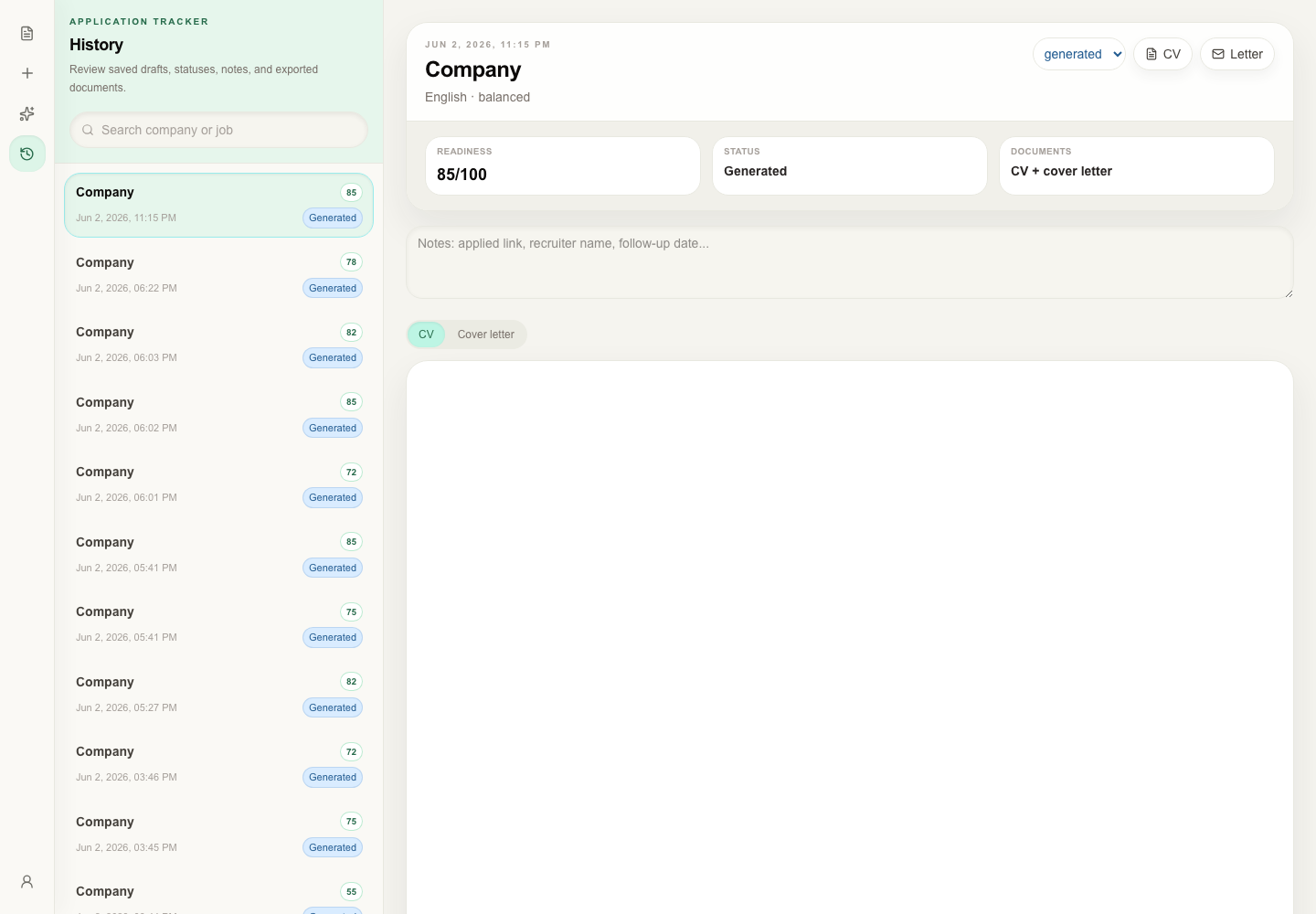
Fit analysis screen showing matched skills, gaps, and 53% score before generation

Fit analysis

Evidence matches, gaps, and risk flags surfaced before any document is written.

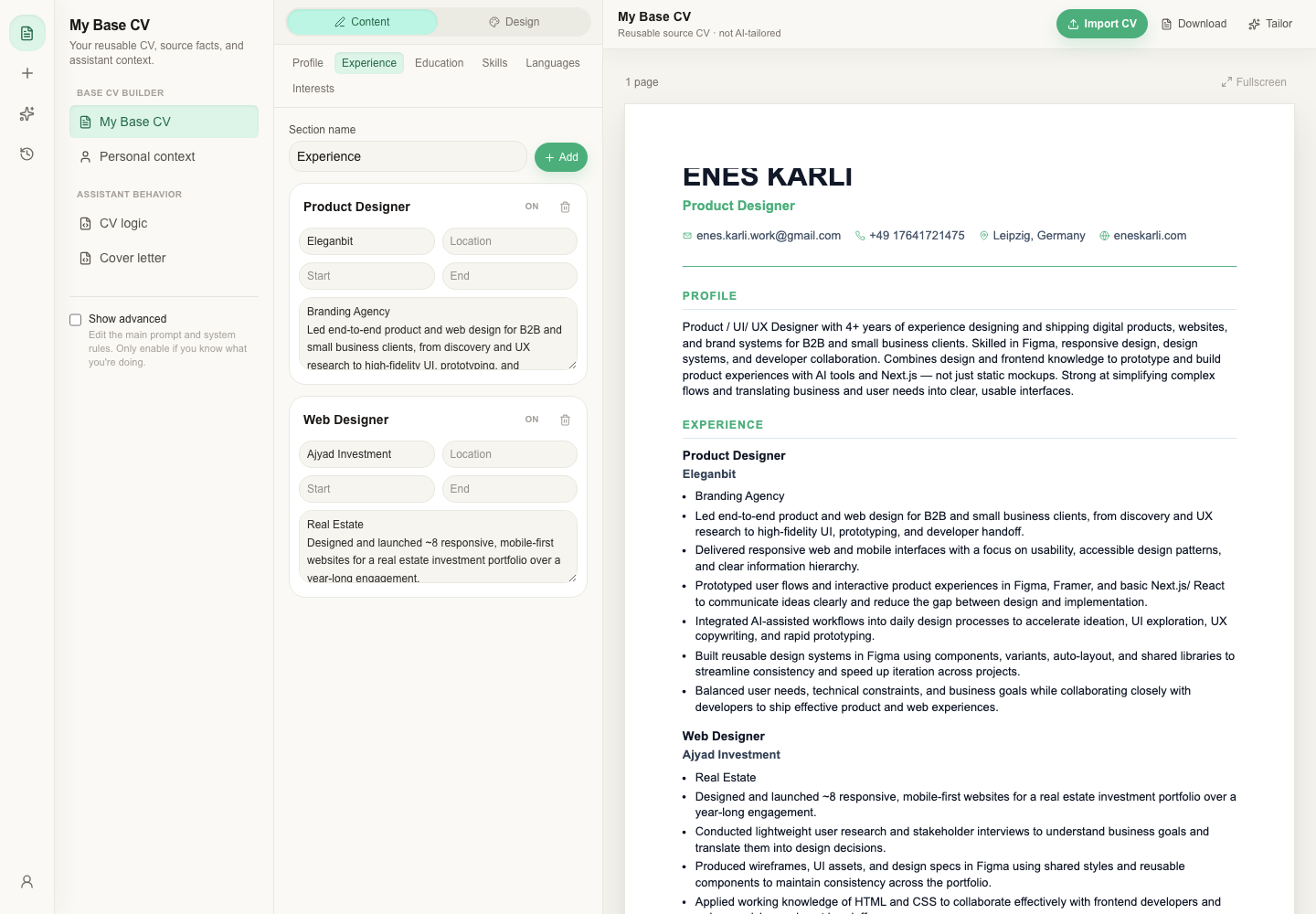
Career profile as the verified source of truth for generation

Career profile

Single source of verified data. Constrains AI to what the user can substantiate.

Application history with readiness scores and status per role

Application history

All applications saved with scores and versioned documents.

09 - Early validation

Early signals point in the right direction

Signals below come from personal use and informal sessions with job-seeking friends - not a controlled study. Treated as directional only.

20 → 2
Minutes per tailored application - general AI chat vs. RolePilot
SELF-REPORTED
10×
Speed improvement reported consistently across early informal sessions
DIRECTIONAL ONLY
Unprompted
Several participants continued using RolePilot in their active job search without being asked to
INFORMAL OBSERVATION
The clearest UX signal was not just speed. Users made fit decisions faster, needed less explanation about why a gap mattered, and trusted the output more when score, evidence, and next action were visible together.
"The design problem wasn't making AI write more. It was giving users enough visibility to know what to trust and what to change."

10 - Contribution

Sole designer and engineer - end to end

Owned every stage: problem framing, product strategy, interaction design, system design, implementation, and deployment preparation.

Project facts

Project facts

Role
Sole product designer and developer
Started
May 5, 2026
Status
Working MVP - pre-deployment
Tools
Figma, Next.js, TypeScript, AI APIs, Claude, Codex CLI
Scope split

What I designed

  • Problem framing
  • Product strategy
  • Information architecture
  • User flows
  • Interaction design
  • Visual design
  • AI behavior design
  • Prompt contracts

What I built

  • Resume data model
  • Evidence and scoring logic
  • Frontend implementation
  • Backend implementation
  • Testing and iteration
  • Deployment preparation
AI tool disclosure: Used Figma, Claude, and Codex CLI for ideation, code review, and implementation assistance. Problem definition, product direction, interaction design, system decisions, and final approval remained mine throughout.

Contact and links

Try the product or get in touch

Live demo and contact details below.